

+46 33 323 31 33
Monday – Friday, 08:00 – 17:00 (closed for lunch 12.00-13.00)
Central European Time (UTC+1)

Or contact us by filling this form

Need to attach a file? Log in to app.serviceprotocol.com, click on the Support symbol (a question mark) and fill in your question or description of an error.
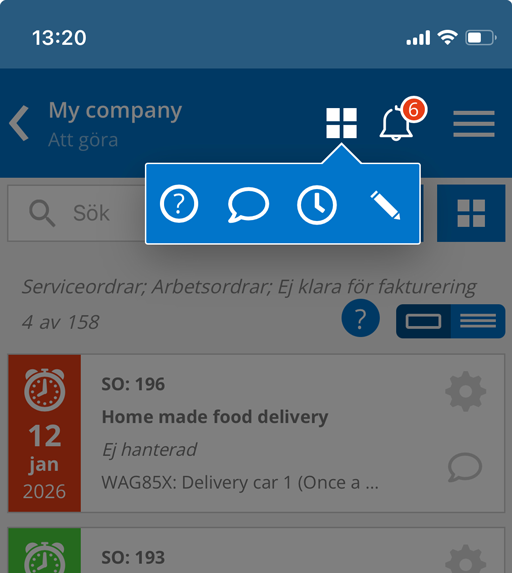
If you have reduced the browser window or are using mobile, you will find the question mark under the symbol that looks like a window with four panes.
Attach a debug file
If you have encountered an error on a page, you can help us by creating a debug file and sending it in. This is best done on a computer.
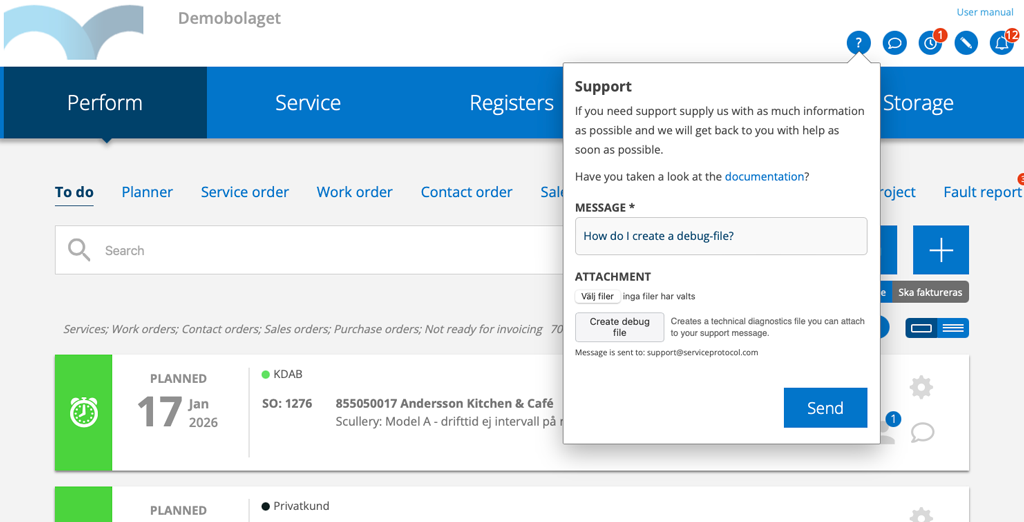
Do this:
- Make sure you are on the page that is causing the problem/error.
- Click the Create Debug File button.
- The file will be created and placed on your computer. Click “Choose Files:” and locate the file.
- Fill in a message. Describe the error in as much detail as possible.
- Click Send.

