
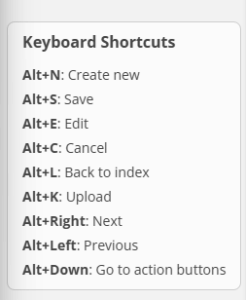
Learn some keyboard shortcuts
Use these keyboard shortcuts = Alt
Unfortunately, it doesn’t work on Mac.
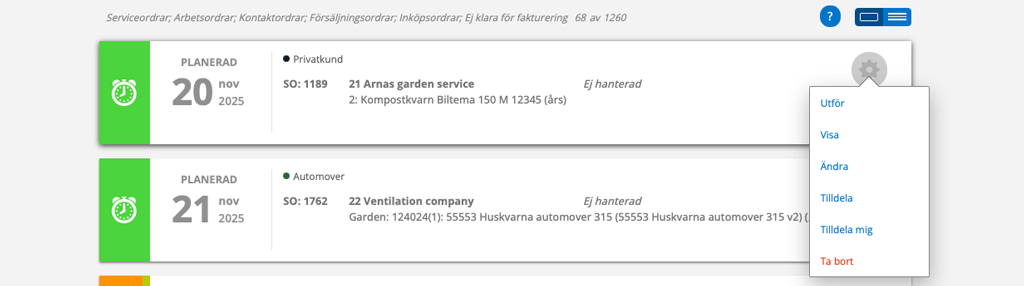
cogwheel = shortcut
Use the gear in lists to quickly Assign, Change, Execute or continue an already started service order.
Is your list of orders loading slowly?
Set a filter that suits your needs.
Here are instructions on how to set filters and save your own favourite filters.
Filter settings
Can’t find the order you’re looking for? Check your filter settings. Maybe you need to change the date setting? Each function has its own set of filter settings.
Collection function
Do you need to change many orders or prices at once? See if the collection function can help you with that.
Preset messages
By adding standard messages as templates, you don’t have to formulate your message every time you send a message to a customer. Just choose from your different messages.
Here you find instructions on how to add message templates.
No next service?
How do you know if a service has not been generated? If you see a red exclamation mark in the menu next to Service Objects, there is a service object that should have a next service but does not.
Here you find instructions on how to find these objekts.
Save your signature
By saving your signature in your account settings, you avoid signing protocols.
Here you find instructions on how to save your signature.
Check your permissions
Can’t you do what is written in an article? Talk to someone who has admin permission and ask them to review your permissions. You may be missing a permission that is important for your assignments.
Link to an order
Type @ and order type + order number and it will become a clickable link! Example: @AO11.
Works in comment fields and in a contact order’s contact point.
What is your best tip?
Please email us your tip and we will add it here. Thank you!

