
26-03-26 – Links in Planner, new category selection in To Do, Expression support
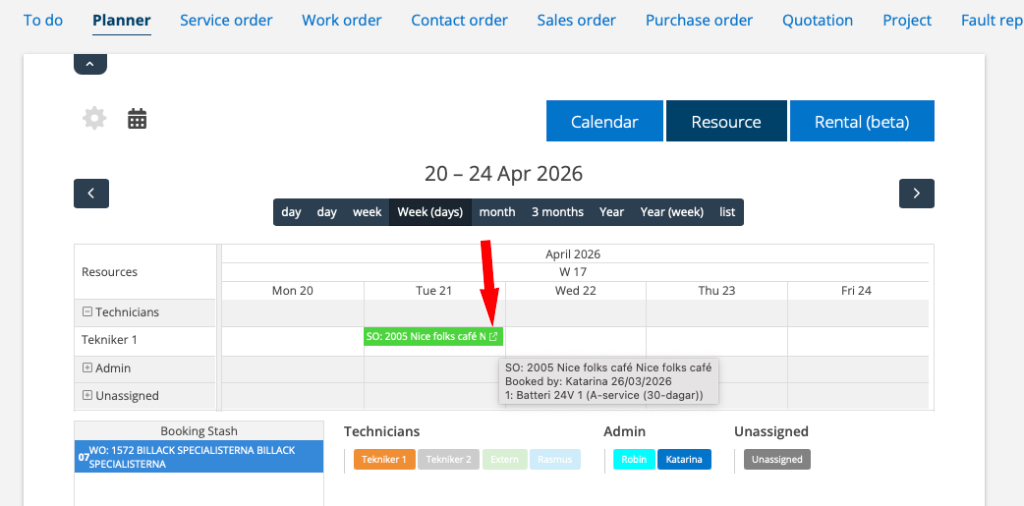

Link to orders in the Planner
In the Planner you can now go directly to an order without opening the booking. On the far right of a booking you will see a link symbol. In some browsers you will see that the mouse cursor becomes a pointing hand where you should click to open the order. A full hand leads to the booking itself.
Work is underway to make the feature work in all view options and different browsers.
The link symbol has been added to all places where something (a protocol, for example) opens in a new window.
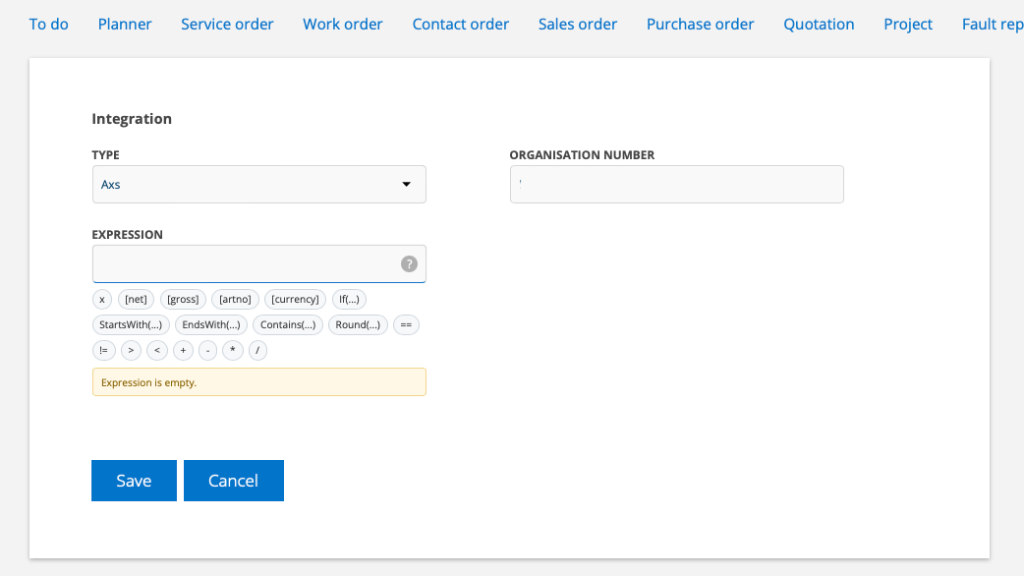
Expression support
You can set an “Expression” for the price of articles from a specific supplier. For example, an Expression can be used to give different markups for different price levels (markup steps).
The expression “overrides” general markups.
Instructions and a tool are now available to support creating expressions linked to a supplier.
Do this:
- Select a supplier in your list under Integrations
- Place the cursor in the EXPRESSION field.
- Build your expression by clicking on a variable to select it.
If you have done it correctly, you will get the text “Expression is valid” and at the bottom you will see examples of what your selected variables are.

Service interval information as category selection
In To Do you can now choose to have a heading for Service Interval. Click the blue checkbox on the far right to select the category.

