
So-called EDI connection to suppliers makes it easy to order goods to orders.
When the connection is in place, you just enter the order number when ordering and the articles are then pushed straight into the order in the system.
In the list below, you can see which suppliers we currently offer connection to.
Is your supplier not on the list? Contact us and we will discuss with the supplier. All major suppliers can be added, provided that the supplier offers so-called EDI connection.
If you instead import an article register, the supplier can be specified on the article.
Admin permission required
Concerning Crown and sonepar
For Crown and Sonepar (formerly Elektroskandia), the EDI file they send to us is used to create a supplier invoice in Fortnox. This is how it works: a file is sent to us via FTP, we interpret the file (.xml) and enter it as a delivery note with us and as a supplier invoice in Fortnox.
How to add a EDI connection
Step 1
Notify your salesperson at the respective supplier that you want to connect with “EDI” to us at serviceprotocol.com. Your salesperson then places an order for this and articles will automatically enter the order number you enter when ordering from the supplier.
Step 2
- Go to the page Group settings.
- Click on Add integration found at the bottom of the page.
- Select the provider you want to connect to in the list.
- Fill in the requested information, your customer number or organization number.
Step 3 – EXPRESSION
Fill in an equation in the EXPRESSION field if you wish to set conditions (expressions) for the price of articles from this particular supplier. The equation can, for example, be used to give different markups for different price levels (markup steps)
An EDI equation “stands above” general markups. Decimals are written with a period, e.g.: 2.1
Here some examples:
1. (5*Pow(x,-0.25)*x)+x (This is a logarithmic formula that makes the markup smaller the higher the price)
2. x*1.6 (All prices are increased by 1.6)
3. x*2+200 (100% markup + 200kr)
As support, there are instructions and support for creating an equation. Click on a variable to select it and it will be added to your equation. You will see these when you place the cursor in the EXPRESSION field.
Click on a variable to select it and it will be added to the Expression.
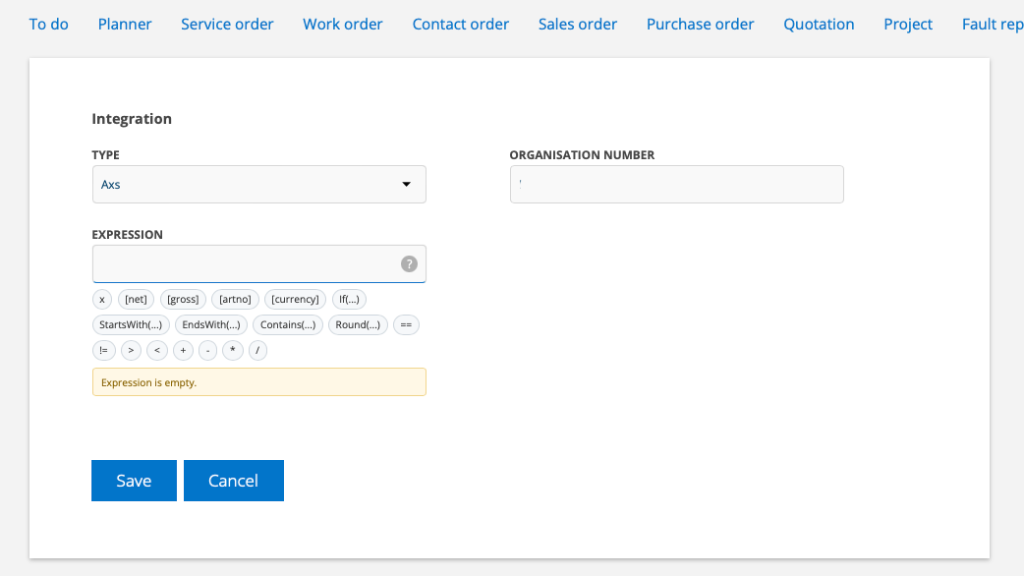
You will find instructions under the ? (questionsmark).
Example
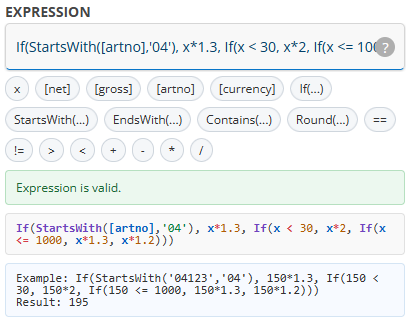
Steg 4 – Integration settings
Check this box if you want to use the gross price from supplier. The setting option is not available for all suppliers and is only displayed where the setting is possible.
Concerning articles
Also see how to enter supplier on a article record under point 10 HERE
Supplier invoice
Supplier invoices can also be sent to your inbox or uploaded and managed by the system. Learn more in the article: Supplier invoices.
List of suppliers
To connect to Ahlsells or TVH add your organisation number.



On each article line, you will then see which subgroup the article is ordered for.



To connect to these suppliers add your customer number at the supplier.


The EDI file is also used to create supplier invoices in Fortnox.








On each article line, you will then see which subgroup the article is ordered for.

