
You can set currencies on the Group Settings page by clicking Edit. Admin permissions are required.
Price unit
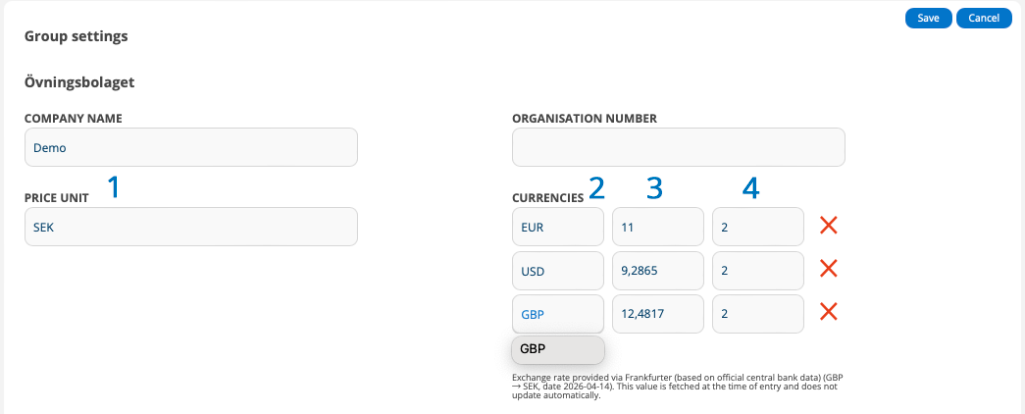
- Enter the price unit. The price unit is the unit that is displayed after a price, e.g. EUR. Here you can use your own expressions for the price. (1)
You can also use these symbols:- “kr” → interpreted as SEK
- “$” → interpreted as USD
- “€” → interpreted as EUR
Currencies
The feature to set and use currencies is under development. For now, your settings here do not affect any orders, only delivery notes.
If you purchase via EDI from suppliers who have specified a currency other than your Price unit, enter the currency and value for the currency. The system then takes the price on the delivery note and multiplies it by the value you have specified for the currency here.
Check with the supplier how the currency is specified on the delivery note and specify it in the same way in the service protocol, e.g. EUR.
Suggestions when entering currency
When you start typing in the currency field (2), you will be presented with suggestions for common currency codes (e.g. SEK, EUR, USD). It is important that you use these codes and do not change the name of the code (unlike Price Unit). If the code is changed, the system will not recognise the currency and its set value.
Automatic exchange rate retrieval
When both your group’s base currency (Price Unit) and another currency are entered correctly, a current exchange rate is automatically retrieved and filled in field (3). A text is displayed with information about which currencies and the date of the retrieval.
Example: Exchange rate provided via Frankfurter (based on official central bank data) (AED → SEK, date 2026-04-14). This value is fetched at the time of entry and does not update automatically.
You can change the retrieved exchange rate and your set value will be used.
Automatic completion of decimals
When you enter a currency code, the number of decimal places is automatically filled in (4). Most currencies have 2 decimal places, but there are currencies with 0 or 3 decimal places.
Do not change the number of decimal places!
Good to know:
- The rate is retrieved once when selecting/changing currency.
- It does not automatically update over time
- If the rate needs to be accurate (e.g. for invoicing), it should always be verified manually.
- If you change the Price Unit, currencies will not be updated automatically and you will not receive a warning.
Currencies on delivery notes
Currency is displayed in a delivery if it is created via a delivery note.
If the delivery note has been converted, it uses the currency with a factor of 1 or the group’s price unit if no currency has been entered.
If you do not have a matching converter, the same currency as on the delivery note will be added. This means that if you receive a delivery note in EUR, have not set a value for EUR and the price is 1, the price will be stated as 1 (EUR).
Currency on customer
This feature allows you to specify a default currency for a customer. When enabled, orders, quotes, services, and agreements are displayed in the customer’s currency, while the underlying prices in the system are still saved in the company’s default currency.
Support is available for Fortnox and Kleer.
Activate the feature
The feature is activated in Group Settings.
- Scroll to the bottom of the Group Settings page and click the Edit button. Admin permissions required.
- Select “Use currency per customer”.
- Fill in the currencies you will use with currency factors, decimals and payment rounding on the page.
- Choose which currency should be the default currency.
Important to know:
- The customer’s currency affects display, summarisation, editing, and some integrations, but does not change existing saved article prices.
- The company’s default currency should correspond to the currency in which the article register is already priced. Changing the default currency does not automatically convert the article register.
- If the item register contains mixed currencies, for example some prices in SEK and others in EUR, these prices first need to be corrected and normalised before currency support is used.
- When editing in another currency, the corresponding value in the default currency is also displayed for internal users.
- Customer users do not see internal currency factors or the default currency reference value.
- Automatically retrieved exchange rates are only suggestions/reference values. They should be adjusted according to your own pricing policy, margins and currency risk.
- Rounding shown in the system is an estimate. The final rounding on the invoice or accounting document is done by the respective financial system (Fortnox and Kleer)
- When the setting is off, customer currency does not affect orders or integrations. Currency factors still exist for existing price conversion from EDI.
Set currency for individual customer:
- Go to a customer card
- Click Edit
- Select currency in the CURRENCY field
- Save
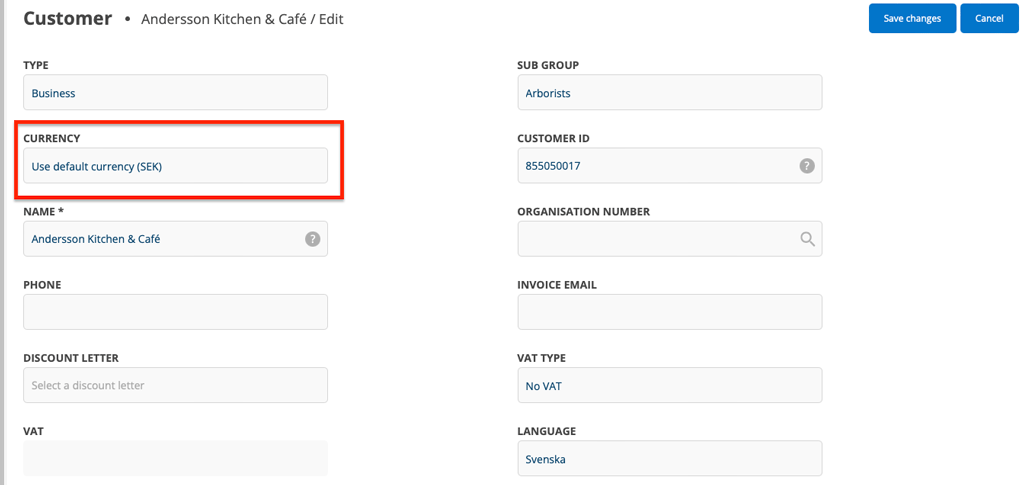
Now the customer’s quotes, work orders, service, sales orders, service protocols, and agreements will be displayed in the set customer currency. The setting does not change existing saved article prices.
Note:
An order does not yet save its own “historical” currency/rate. If the customer’s currency or currency factor changes subsequently, older orders may therefore be displayed with the new currency/rate when reopened. However, the saved base prices do not change.

