
By creating and setting up a QR code on the service object, your customers can report faults on a service object without being a user or customer user.
Do this
- Enable the Service Object Settings – Allow anonymous access and Allow anonymous fault reporting.
- Create your own print template for the QR-code with the tag {ServiceObjectFaultReportQRCode}. Here you find the tags you can use.
- Upload the template under Module Settings – Service Object Settings – Print Template.
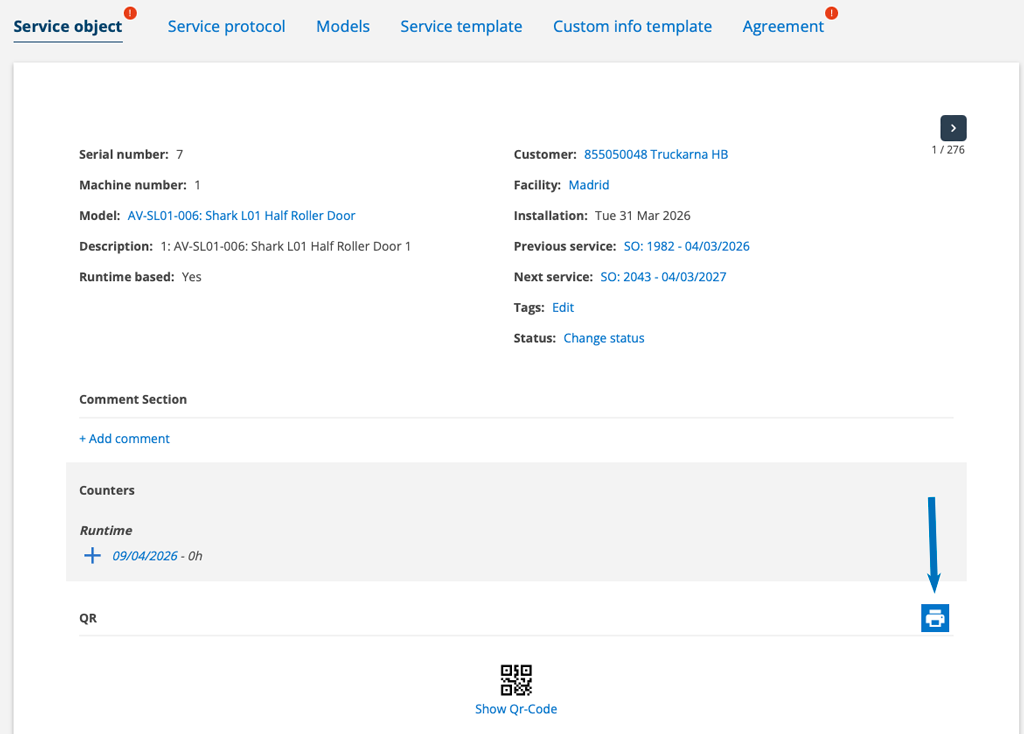
- Go to the service object, click on the printer symbol to the right of the object (see image 1). Select your uploaded template and print the document.
- Post the document with the QR code on the service object.
- When the customer has filled out an fault report, you will find it under the Fault Report function. The person assigned to the customer will receive a notification.
This is what the customer does
- The customer scans the QR code and fills in their name, email address and description of the error and clicks Save.
If there is a contact person at the facility, that information is retrieved. If there are multiple contact persons at the facility, the system selects the contact person who was first added to the facility. If there is no contact person entered, the customer fills in their information (or changes the retrieved information). - The customer receives a notification on their device that the fault report has been sent.

